Out of range, the app works the same: the map, the cards, adding and editing. Your changes wait safely on the phone and go up on their own when the connection returns.
Save an area before you go
Move the map to the area you'll work in, tap ⋮, then "Offline areas", and "Save this area". The app saves the records, roads and labels for that area to the phone. A smaller area saves faster; if the area is too large, the app asks you to zoom in first.
The same sheet lists the areas you've saved. "Remove" one when the job is done.
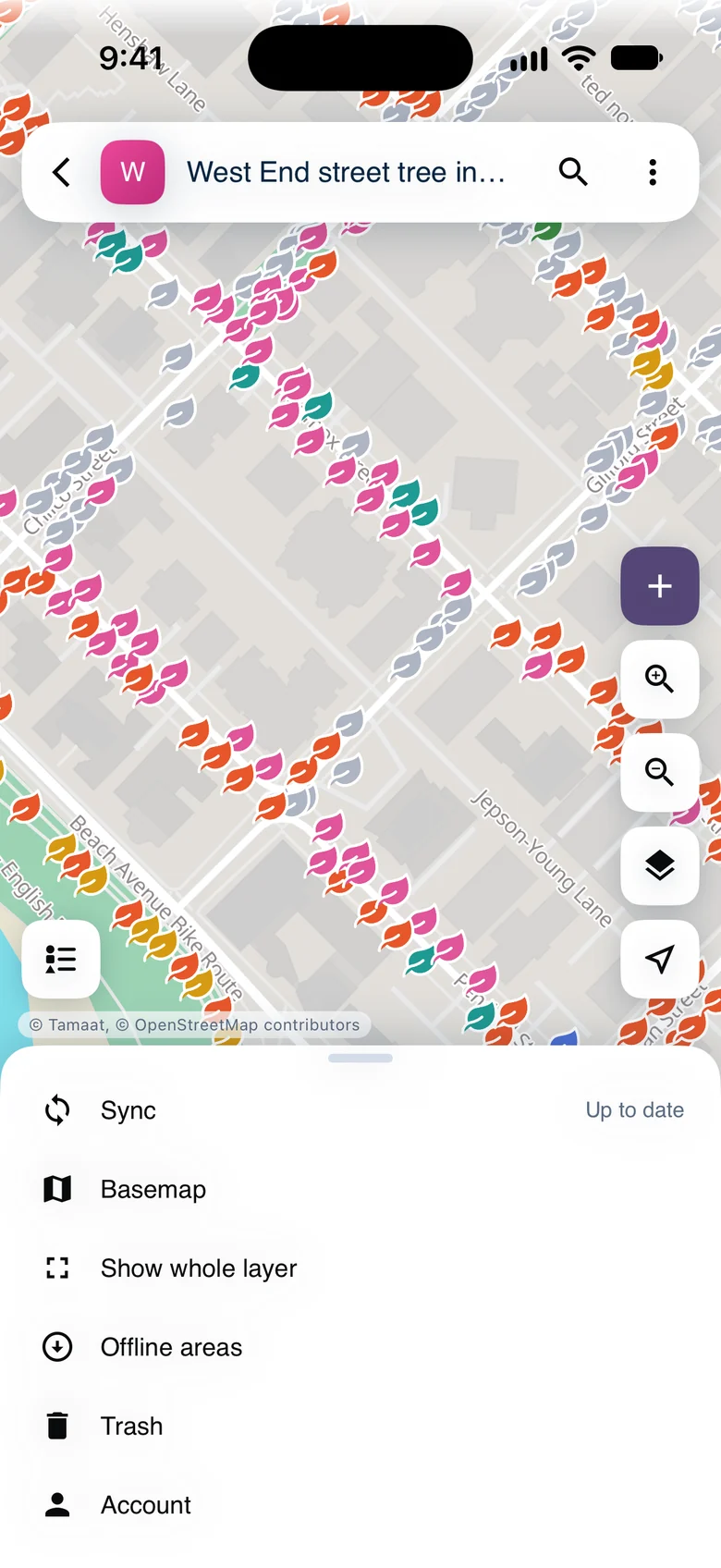 The menu with Sync and the offline areas
Collect without a signal
Add, edit, move and delete as usual. Each change is kept on the phone, protected by its screen lock, until it syncs.
Sync
Sync runs by itself whenever you're online. While changes are waiting, a small badge on ⋮ shows how many. In the menu, "Sync" reads "Up to date" once everything has gone up; tap it to sync straight away.
If a sync needs you, for example to sign in again, the badge becomes a dot and the "Sync" row says what to do. Records changed by someone else while you were offline are marked "Changed elsewhere" for review.
Demo data: City of Vancouver Open Data — street trees.